> ## Documentation Index
> Fetch the complete documentation index at: https://docs.eolasflow.ai/llms.txt
> Use this file to discover all available pages before exploring further.
# Outreach
> Execute AI calling campaigns with contact lists
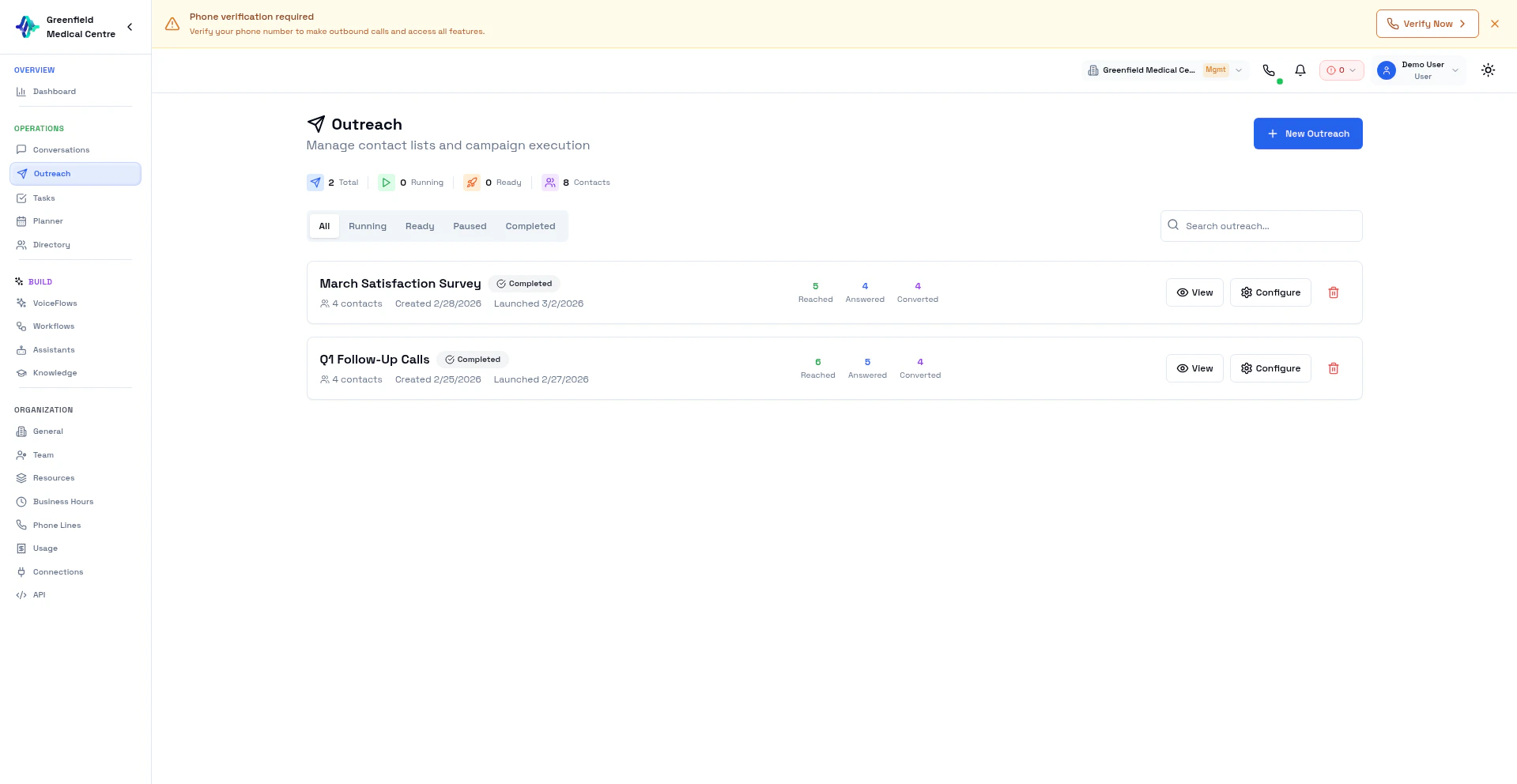 Outreach is where you execute your AI calling campaigns. While **VoiceFlows** define *how* to make calls, **Outreach** is *the actual execution* — applying a VoiceFlow to a specific list of contacts.
## VoiceFlows vs Outreach
| VoiceFlows | Outreach |
| ------------------------------- | ------------------------------ |
| Reusable templates | Specific execution instances |
| Define AI assistant, objectives | Apply a VoiceFlow to contacts |
| No contacts attached | Contacts uploaded per outreach |
| Configure once, use many times | Track real-time progress |
**Think of it this way:** A VoiceFlow is your playbook. An Outreach is running that playbook with a specific roster of contacts.
## Creating an Outreach
Go to **Outreach** in the Engage section and click **New Outreach**.
Give it a descriptive name (e.g., "January Sales Push — West Region").
Upload a CSV file with your contact list.
Choose which VoiceFlow to use for these calls.
Set when and how fast to make calls.
Click **Launch** when ready to start calling.
## Schedule Options
| Schedule | Description |
| ------------------ | ------------------------------- |
| **Now** | Start immediately |
| **Business Hours** | Only call during business hours |
| **Custom** | Set specific start/end times |
## Pacing Options
| Pacing | Speed | Best For |
| ---------- | ---------------- | ------------------------------ |
| **Slow** | 1 call/minute | Testing, high-touch VoiceFlows |
| **Normal** | 5 calls/minute | Standard outreach |
| **Fast** | 10+ calls/minute | High-volume campaigns |
You can also set **Max Concurrent Calls** to limit simultaneous calls.
Start with **Slow** pacing for new VoiceFlows to monitor quality before scaling up.
## Outreach Statuses
| Status | Description |
| --------------- | ------------------------------------ |
| **Ready** | Contacts uploaded, waiting to launch |
| **In Progress** | Actively making calls |
| **Paused** | Temporarily stopped |
| **Completed** | All contacts processed |
## Managing Outreach
* **Launch** — Start calling on a "Ready" outreach
* **Pause** — Temporarily stop calls (to review results or adjust settings)
* **Resume** — Continue where you left off
* **Delete** — Remove the outreach (only when Ready or Completed)
## Progress Tracking
While an outreach runs, you can see:
* **Progress Bar** — Percentage of contacts processed
* **Total Contacts** — Number in this outreach
* **Reached** — Contacts successfully called
* **Answered** — Calls that were picked up
* **Converted** — Calls achieving the VoiceFlow objective
## Contact CSV Format
| Column | Required | Description |
| --------- | -------- | ------------------------------ |
| `name` | Yes | Contact's full name |
| `phone` | Yes | Phone number with country code |
| `email` | No | Email address |
| `company` | No | Company name |
```csv theme={null}
name,phone,email,company
John Smith,+15551234567,john@example.com,Acme Corp
Jane Doe,+15559876543,jane@example.com,Tech Inc
```
## Best Practices
**Test First:** Run a small outreach (10-20 contacts) before launching at scale.
**Use Business Hours:** Respect time zones and call during appropriate hours.
**Compliance:** Ensure you have consent to call these contacts. Follow TCPA, GDPR, and local regulations.
## Viewing Results
After an outreach completes:
1. Go to **Outreach** and click on the completed outreach
2. View summary statistics
3. Click through to **Conversations** for detailed call records
## Next Steps
Set up VoiceFlow templates for outreach
Analyze call results from outreach
Prepare contact lists
Customize your AI assistant
Outreach is where you execute your AI calling campaigns. While **VoiceFlows** define *how* to make calls, **Outreach** is *the actual execution* — applying a VoiceFlow to a specific list of contacts.
## VoiceFlows vs Outreach
| VoiceFlows | Outreach |
| ------------------------------- | ------------------------------ |
| Reusable templates | Specific execution instances |
| Define AI assistant, objectives | Apply a VoiceFlow to contacts |
| No contacts attached | Contacts uploaded per outreach |
| Configure once, use many times | Track real-time progress |
**Think of it this way:** A VoiceFlow is your playbook. An Outreach is running that playbook with a specific roster of contacts.
## Creating an Outreach
Go to **Outreach** in the Engage section and click **New Outreach**.
Give it a descriptive name (e.g., "January Sales Push — West Region").
Upload a CSV file with your contact list.
Choose which VoiceFlow to use for these calls.
Set when and how fast to make calls.
Click **Launch** when ready to start calling.
## Schedule Options
| Schedule | Description |
| ------------------ | ------------------------------- |
| **Now** | Start immediately |
| **Business Hours** | Only call during business hours |
| **Custom** | Set specific start/end times |
## Pacing Options
| Pacing | Speed | Best For |
| ---------- | ---------------- | ------------------------------ |
| **Slow** | 1 call/minute | Testing, high-touch VoiceFlows |
| **Normal** | 5 calls/minute | Standard outreach |
| **Fast** | 10+ calls/minute | High-volume campaigns |
You can also set **Max Concurrent Calls** to limit simultaneous calls.
Start with **Slow** pacing for new VoiceFlows to monitor quality before scaling up.
## Outreach Statuses
| Status | Description |
| --------------- | ------------------------------------ |
| **Ready** | Contacts uploaded, waiting to launch |
| **In Progress** | Actively making calls |
| **Paused** | Temporarily stopped |
| **Completed** | All contacts processed |
## Managing Outreach
* **Launch** — Start calling on a "Ready" outreach
* **Pause** — Temporarily stop calls (to review results or adjust settings)
* **Resume** — Continue where you left off
* **Delete** — Remove the outreach (only when Ready or Completed)
## Progress Tracking
While an outreach runs, you can see:
* **Progress Bar** — Percentage of contacts processed
* **Total Contacts** — Number in this outreach
* **Reached** — Contacts successfully called
* **Answered** — Calls that were picked up
* **Converted** — Calls achieving the VoiceFlow objective
## Contact CSV Format
| Column | Required | Description |
| --------- | -------- | ------------------------------ |
| `name` | Yes | Contact's full name |
| `phone` | Yes | Phone number with country code |
| `email` | No | Email address |
| `company` | No | Company name |
```csv theme={null}
name,phone,email,company
John Smith,+15551234567,john@example.com,Acme Corp
Jane Doe,+15559876543,jane@example.com,Tech Inc
```
## Best Practices
**Test First:** Run a small outreach (10-20 contacts) before launching at scale.
**Use Business Hours:** Respect time zones and call during appropriate hours.
**Compliance:** Ensure you have consent to call these contacts. Follow TCPA, GDPR, and local regulations.
## Viewing Results
After an outreach completes:
1. Go to **Outreach** and click on the completed outreach
2. View summary statistics
3. Click through to **Conversations** for detailed call records
## Next Steps
Set up VoiceFlow templates for outreach
Analyze call results from outreach
Prepare contact lists
Customize your AI assistant