Documentation Index

Fetch the complete documentation index at: https://docs.eolasflow.ai/llms.txt

Use this file to discover all available pages before exploring further.

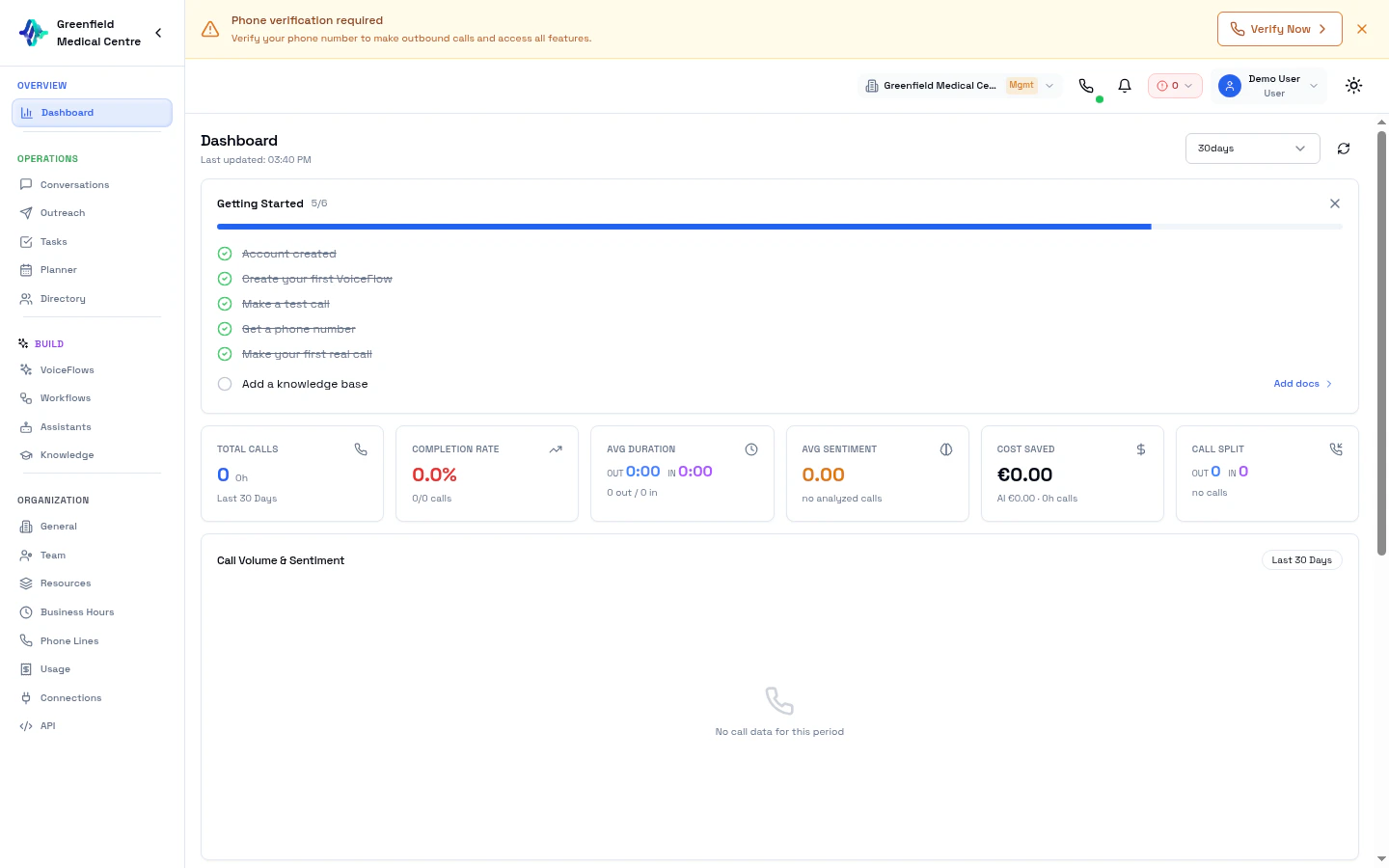
EolasFlow Dashboard showing onboarding checklist and key metrics The Dashboard is your command center for monitoring AI calling operations. Get a real-time overview of contacts, VoiceFlows, calls, and system performance.

Key Metrics

The Dashboard displays primary performance metrics at the top:
MetricDescription
Total ContactsNumber of contacts in your directory
Active VoiceFlowsCurrently live VoiceFlows
Conversion RatePercentage of calls achieving their objective
Total CallsAll-time call count

First-Time Setup

When you first log in, a Welcome Modal greets you with your free starter credits and a quick-start guide. After dismissing the welcome screen, an Onboarding Checklist card appears at the top of your dashboard. It tracks six setup steps:
StepWhat to Do
Create AccountSign up and verify your email
Create a VoiceFlowSet up your first AI calling configuration
Make a Test CallUse the Softphone to test your assistant
Get a Phone NumberPurchase a number from Phone Lines
Make a Real CallPlace your first live call
Upload to Knowledge BaseAdd documents for your assistant to reference
  • A progress bar shows your completion percentage
  • Each step links directly to the relevant page
  • Dismiss the checklist when you’re comfortable, or watch it celebrate when all steps are complete
Follow the checklist in order for the smoothest setup experience.

Call Queue Status

If you have call queuing enabled on any VoiceFlow, a Queue Status card appears on your dashboard showing:
  • Active Calls — Number of calls currently in progress
  • Queue Length — Number of callers waiting
  • Caller List — Each queued caller with their phone number, VoiceFlow name, wait time, and queue position
The card auto-refreshes every 5 seconds. A pulsing green indicator shows when the queue is active.
See Call Queue for full setup instructions.

Recent Call Activity

View your most recent calls with AI-enhanced insights:
  • Contact Name — Who was called
  • Duration — Call length
  • Outcome — Result (Successful, No Answer, Not Interested, etc.)
  • Sentiment — AI-analyzed mood (Positive, Neutral, Negative)
  • Summary — AI-generated call summary
  • VoiceFlow — Which VoiceFlow initiated the call
Sentiment analysis is powered by a two-stage AI pipeline: first cleaning and labeling transcript segments, then generating overall analysis with sentiment timeline.

Quick Navigation

The sidebar organizes all features into six sections:
SectionContains
Getting StartedDashboard
BuildVoiceFlows, VoiceFlow Studio, Assistants, Knowledge, Workflows
EngageDirectory, Outreach, Softphone, Planner, WhatsApp, Call Queue, Widget
AnalyzeConversations, Tasks
ConnectConnections, Webhooks, MCP, Automation
ManageOrganization, Enterprise, Phone Lines, Usage, API

Understanding Call Outcomes

OutcomeMeaning
SuccessfulCall achieved its objective
No AnswerContact didn’t pick up
Not InterestedContact declined
TransferredCall was transferred to a live agent
CallbackContact requested a callback

Understanding Sentiment

AI analyzes each call to determine customer sentiment:
SentimentIndicator
PositiveCustomer showed interest, engaged well
NeutralStandard conversation, no strong indicators
NegativeCustomer was frustrated or disengaged
Use sentiment data to improve your assistant’s prompts. Review calls with negative sentiment to identify areas for improvement.

Next Steps

Directory

Add and organize your contacts

VoiceFlows

Set up AI calling VoiceFlows

Outreach

Execute outbound campaigns

Conversations

Analyze detailed call records